# Flux Lura
> Convert images, audio and video for free in your browser
A free image, audio and video converter that runs FFmpeg.wasm in the browser, so your files are converted locally and never uploaded.
- Type: Web Tool
- Role: Full-stack Developer
- Tech: nextjs, react, ffmpeg, typescript, shadcn-ui, tailwindcss
- Published: 2025-01-01
- Updated: 2026-10-04
- Live: https://fluxlura.vercel.app
- Repo: https://github.com/AayushBharti/Flux-Lura
- URL: https://aayushbharti.in/projects/flux-lura
**TL;DR:** Flux Lura is a Next.js web app that converts images, audio and video entirely in the browser using FFmpeg.wasm, so no file leaves the device. It loads the single-threaded @ffmpeg/core 0.12.2 build, a 31.6MB WebAssembly download. The hard part is working inside the browser's limits on memory, threading and codec support.
## Highlights
- Hand-tuned FFmpeg presets for 16 formats
- Only offers conversions that will work
- Images, audio and video in one tool
---
## What it is
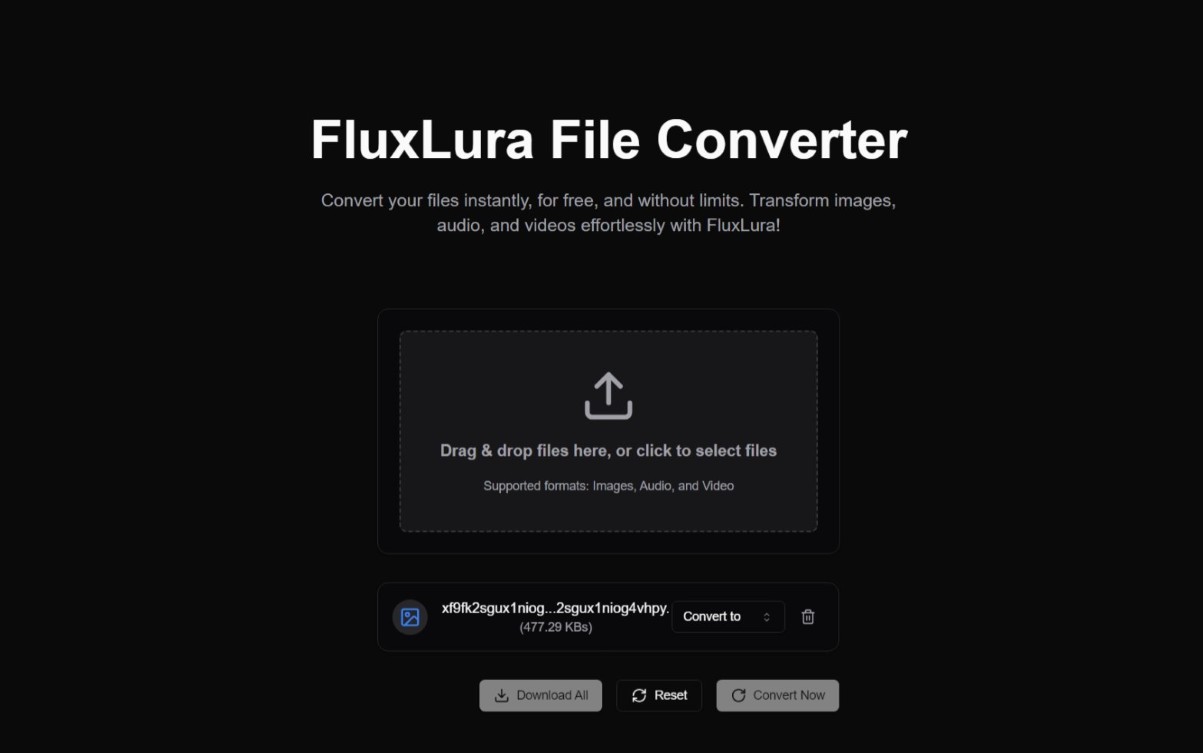
Flux Lura converts images, audio and video in the browser. You drop a file, pick a target format such as WebP to PNG or WAV to OGG, and download the result. The conversion runs on your machine with FFmpeg.wasm, a WebAssembly build of FFmpeg, so no file is ever uploaded to a server.
I built it to avoid uploading files to converter sites, and as an excuse to use WebAssembly in a real project.
---
---
On page load, Flux Lura fetches `@ffmpeg/core` 0.12.2 from unpkg and wraps the JS and WASM files in blob URLs with `toBlobURL`. The `.wasm` file alone is 31.6MB, so the Convert button can't do anything until that download finishes.
Each conversion follows the same four steps. The input is written into FFmpeg's in-memory filesystem, `exec` runs a command built from per-format arguments (MP4 gets `libx264` at CRF 23 with `+faststart`, MP3 gets `libmp3lame` at 192k), the output is read back into a Blob URL, and both files are deleted. That last step matters more than it does with server-side FFmpeg: nothing cleans up WASM memory for you, and failing to free those files after a conversion leads to crashes on large inputs.
```mermaid
flowchart LR
L["Page load
@ffmpeg/core 0.12.2 from unpkg
wrapped in blob URLs"]:::cyan --> W
subgraph C["Every conversion, in the tab"]
direction LR
W["Write the input
to the in-memory FS"]:::blue --> X["exec with
per-format arguments"]:::violet
X --> RD["Read the output
into a Blob URL"]:::green
RD --> D["Delete both files"]:::rose
end
```
The browser sandbox sets the other limits. Not every FFmpeg codec is in the WASM build, and multi-threaded FFmpeg needs `SharedArrayBuffer`, which only works on cross-origin isolated pages (specific COOP and COEP headers). Flux Lura sets neither header and loads the single-threaded core. Conversion speed depends on the visitor's hardware, which is the trade-off for never uploading anything.
The format list is narrower than FFmpeg's. The "Convert to" menu only offers formats from the file's own category (image, audio or video), so you can't pull an MP3 out of an MP4, and an `isConversionSupported` check also blocks conversions between raster formats and SVG.
---
## What I'd change
The progress bar is fake: it sits at 0 during conversion and jumps to 100 when it's done, and the UI holds every conversion to at least 2 seconds. FFmpeg.wasm emits progress events, so I'd wire `ffmpeg.on("progress")` into the bar.
---
## Frequently asked questions
### What is Flux Lura?
Flux Lura is a free online multimedia converter for images, audio and video that runs entirely in the browser. You drop a file, choose a target format and convert, with a progress bar and a download link when it finishes.
### Does Flux Lura upload my files to a server?
No. Flux Lura processes every file client-side with FFmpeg.wasm, a WebAssembly build of FFmpeg that runs in the browser's sandbox, so no file ever leaves your machine.
### What file formats can Flux Lura convert?
Flux Lura converts within a media category: image to image, audio to audio and video to video, such as WebP to PNG, WAV to OGG or MOV to MP4. It doesn't offer cross-category conversions like extracting an MP3 from an MP4. Because conversion runs locally, speed depends on your own hardware.
### What are the limitations of running FFmpeg in the browser?
FFmpeg.wasm memory is constrained by the browser sandbox, multi-threading support varies across browsers, and not every FFmpeg codec is in the WASM build. Multi-threaded FFmpeg needs SharedArrayBuffer, which requires cross-origin isolation headers. Flux Lura sets neither header and loads the single-threaded @ffmpeg/core build.
### What is Flux Lura built with?
Flux Lura is built with Next.js, React and TypeScript, styled with Tailwind CSS and shadcn/ui, with FFmpeg.wasm doing the conversion.