

TL;DR: Snippix is a Next.js web app that turns code snippets into styled images for Twitter and LinkedIn. It uses Zustand for editor state, flourite for optional language detection, Highlight.js for highlighting, and html-to-image to export the preview DOM node as PNG or SVG. The hard part was making the exported file match the on-screen preview exactly.
01
What it is
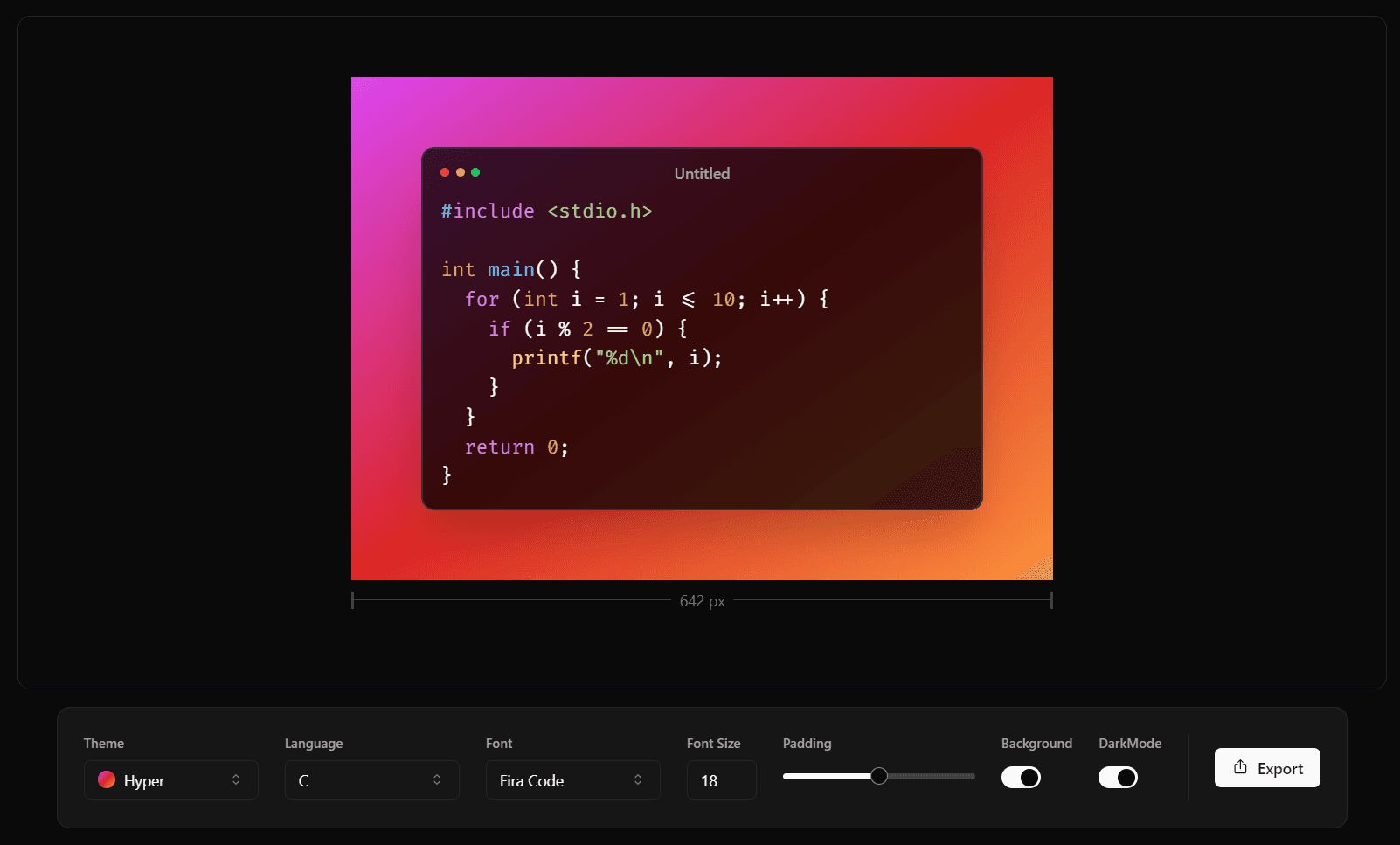
Snippix turns a code snippet into an image for Twitter or LinkedIn. You paste code, pick one of 10 themes and 14 monospace fonts, set font size, padding and background, then save a PNG or SVG or copy the image to the clipboard. Highlight.js does the coloring, and with Auto Detect selected, flourite guesses the language as you type.
I share snippets often enough that I wanted export to be one keystroke: Ctrl+S saves a PNG, Shift+Ctrl+S saves an SVG, and Ctrl+C copies the image.
02
Exporting the preview DOM with html-to-image
The exported file has to look exactly like the preview. I tried canvas-based screenshot libraries first, and they struggled with CSS transforms, custom fonts and z-index stacking, so Snippix uses html-to-image, which captures the actual preview DOM node and lets the browser render it. All three export paths pass pixelRatio: 2, which only affects the raster output: the 642px-wide snippet in the screenshot above saves as a 1,284px-wide PNG. Copying uses toBlob and wraps the result in a ClipboardItem, so the image lands on the clipboard as a PNG with no download step.
DOM capture is fragile in its own way. Scroll offsets, transforms and shadow DOM elements can all break it, so I isolated the preview node and made sure no external CSS bled in during export. The cost is slightly larger files than a canvas render. I'll take that for an exact match.
The preview sits inside re-resizable with a live width readout under it, so the width you drag to is the width you export.
03
What I'd change
Copy Link puts the whole editor state in the URL, with the code base64-encoded by btoa. btoa only accepts Latin-1 characters, so a snippet containing an emoji or non-Latin text throws, and all you see is a "Something went wrong!" toast. I'd encode the code as UTF-8 bytes with TextEncoder before base64-encoding it.